
11 August 2023 | IT Tips
In the modern digital era, PDF documents have become the go-to standard for sharing and presenting information on various platforms. Among the most widely used PDF viewers and editors, Adobe Acrobat Reader DC stands out for its extensive range of features that boost productivity and streamline document management. This comprehensive guide aims to provide an overview of essential functionalities in Adobe Acrobat Reader DC, empowering users to efficiently handle PDF documents with ease.
According to Adobe’s reports, the number of monthly active users had been steadily increasing over the years. The platform’s versatility and user-friendly interface have made it the go-to choice for handling PDF documents, making it a critical tool for individuals and businesses alike.
Adobe Acrobat Reader DC had a massive user base, with millions of downloads and installations worldwide. Here are few tips and tricks to use the Adobe Free Version:
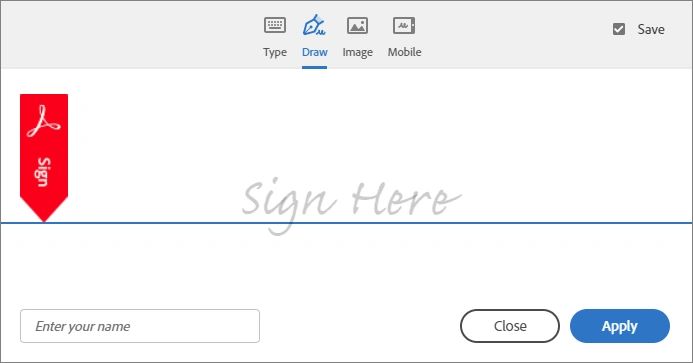
Paste the Saved Signature in Document: Adobe Acrobat Reader DC allows users to add their signature or initials to PDF documents. This feature is particularly handy for signing contracts, forms, or other important paperwork electronically. Users can save their signature as an image file and easily paste it into the appropriate section of the document.
Convert a File to PDF: Acrobat Reader DC provides the ability to convert various file formats, such as Word documents, Excel sheets, or images, into PDF format directly from their native applications.This feature streamlines the process of sharing files in a universally compatible format.
Combine Multiple Files: With the “Combine Files” feature, users can merge multiple PDFs into a single document. This feature is useful when dealing with multiple related documents or when creating comprehensive reports.
Set PDF as Default Printer: By setting Adobe PDF or Acrobat as the default printer, users can efficiently convert any printable file from any application into a PDF document. This seamless integration simplifies the PDF conversion process.
Password Protection and Security Features: Acrobat Reader DC offers basic security options, such as password protection, which ensures that only authorized individuals can access sensitive PDF documents.
Search Functionality: The built-in search feature in Acrobat Reader DC enables users to quickly

locate specific words or phrases within lengthy PDF documents.This saves time and improves efficiency when searching for specific information.
Creating a Digital Signature: Users have the option to create a digital signature by drawing it with a mouse or touchpad or using a scanned image of their physical signature. This digital signature functionality eliminates the need for printing, signing, and rescanning documents, streamlining the signing process.

“Adobe Acrobat Reader DC is a powerful and feature-rich PDF viewer and editor, catering to the needs of both individuals and businesses. Its ability to handle various PDF-related tasks, such as adding signatures, converting files, and merging documents, makes it an essential tool for efficient document management. The security features, including password protection and digital signatures, provide an added layer of protection for sensitive information. As technology continues to evolve, Adobe Acrobat Reader DC remains a reliable solution for working with PDF documents, helping users streamline their workflows and stay productive.”
Share this post: